
High-speed chases just became scary. In this Roblox game, part of the magic is teaming up with a friend or stranger and pulling off the riskiest driving you can manage. Plus, there are Do Not Stop codes to add another helping hand to the experience.
Codes are good for some credits, which you can use to boost your experience. Whether that’s a boost to your swag, via some cosmetics, or to the actual car you drive, you could always do with some extra cash in your pocket.
Here are all the new Do Not Stop codes:
| Code | Reward(s) |
| LASTSTOP | 250 credits |
| DONOTSTOP | 200 credits |
| ROUTE1610 | 150 credits |
| RELEASE | 250 credits |
To get even more free Roblox codes from PCGamesN, click here to follow us on Google.
How do I redeem my Do Not Stop codes?

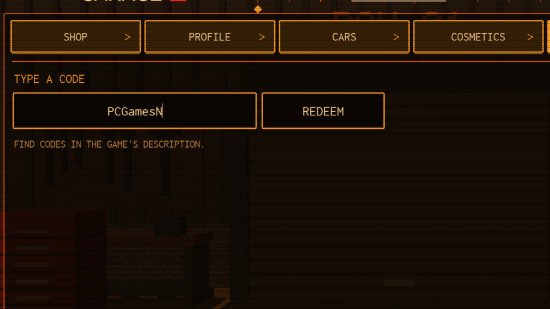
In case you’re too busy driving to have figured out how to redeem Do Not Stop codes, we’ve got the answers right here:
- Open up Do Not Stop in Roblox
- Click on the shop menu on the right
- Head to the ‘codes’ tab and put in the code
- Click ‘redeem’ and find out what you got!
Why aren’t my Do Not Stop codes working?
If your codes aren’t working, something’s probably going wrong with your typing. In order to avoid that problem, we’ve come up with a system that should work better. All you have to do is hit the button and paste it into the code box. This way, you’ll only have a problem if the code has actually already expired. If that happens, just check back in soon and we’ll have more available for you.
How do I get more Do Not Stop codes?
The best way to get more Do Not Stop codes is to check back in here regularly, as we’re code-hunting experts and know exactly how to trace all the freebies that the developer offers. Other than that, you’ll have to wait for them to gift us when they update Do Not Stop, or it hits a like milestone. We’re waiting patiently with you, so until next time!