
Use these new Ball vs Ball codes as they come, and you’ll have a chance to upgrade your most reliable battle orb without partaking in the grind of consecutive games. Some can even award limited-time emotes, opening up the opportunity to dunk on your opponent long after you claim victory in the field.
We might never get to know why Ball Game was indefinitely removed from Roblox, but you can always trust Roblox developers to jump at their chance to give the players what they want – another shot at the inventive ball battler genre. Choose your ball, lock in your aim, and watch as combative spheres bounce around a square arena, slamming into each other with tricks and traps like knives, poison spikes, and talons to deal damage as they collide. It turns the shared experience of watching the DVD logo bounce around the screen into a genuinely engaging brawl – if you’re old cultured enough to know what we’re talking about.
Here are the working Ball vs Ball codes:
| Code | Rewards |
| UPD5 | 100 coins |
| UPD4 | 100 coins |
| UPD3 | 100 coins |
| UPD2 | 100 coins |
| UPD1 | 100 coins |
Follow PCGamesN on Google for guides, news, and even more codes today.
How do I redeem Ball vs Ball codes?

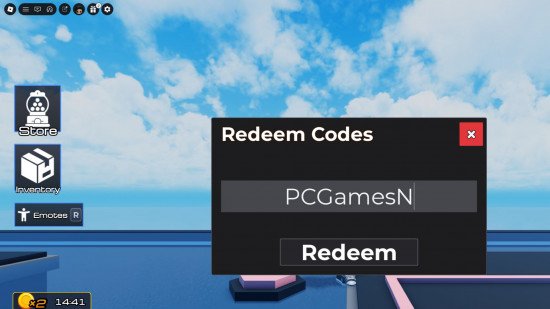
Follow these steps to claim new codes in Ball vs Ball before your first round:
- Launch Ball vs Ball on Roblox.
- Click the present button in the top left corner of the screen.
- Click the ‘codes’ option from the dropdown menu.
- Enter a working code.
- Hit the redeem button.
How do I get more Ball vs Ball codes?
While you won’t find new codes on the game page, you’ll struggle to find them on the Ball vs Ball Discord, too. They’re there, but it takes quite a few clicks to find just the one, with older (but still active) codes not listed in any official capacity.
If you want to look for yourself, click the Discord link at the bottom of the game page to join. The channel that hosts the single officially supplied code is hidden by default. To view it, click the ‘channels and roles’ menu at the top of the channel list, then click to view the ‘announcements’ channel, where you should see the code for the latest update at the bottom of the changelog.
We had to use raw intuition to verify the codes from previous updates, but some players do spout them out in the general chat if enough people ask. You can enter “codes” into the search function and click through pages of requests until you find someone actually listing them out, or you can hope the “#codes channel” request in the ‘suggestions’ channel is actually kept up-to-date with new codes.
Or you can do the simple thing to avoid all the unnecessary clicking by checking in with us each time you’re ready to battle with balls. We keep our list updated with the latest codes, completely removing the need for you to scour the social channels for more.